Usage Examples
This page documents several simple use cases for you to try out.
For full details, see the API Reference, and check out the full
class reference for URDF.
Loading from a File
You can load a URDF from any .urdf file, as long as you fix the links
to be relative or absolute links rather than ROS resource URLs.
>>> from urdfpy import URDF
>>> robot = URDF.load('tests/data/ur5/ur5.urdf')
Saving to a File
You can also export the URDF to a file. Any meshes and images will be dumped using their original relative or absolute names. If the names are relative, they’ll be dumped relative to the new URDF file.
>>> robot.save('/tmp/ur5/ur5.urdf')
Accessing Links and Joints
You have direct access to link and joint information.
>>> for link in robot.links:
...    print(link.name)
...
base_link
shoulder_link
upper_arm_link
forearm_link
wrist_1_link
wrist_2_link
wrist_3_link
ee_link
base
tool0
world
>>> for joint in robot.joints:
...    print('{} connects {} to {}'.format(
...        joint.name, joint.parent, joint.child
...    ))
...
shoulder_pan_joint connects base_link to shoulder_link
shoulder_lift_joint connects shoulder_link to upper_arm_link
elbow_joint connects upper_arm_link to forearm_link
wrist_1_joint connects forearm_link to wrist_1_link
wrist_2_joint connects wrist_1_link to wrist_2_link
wrist_3_joint connects wrist_2_link to wrist_3_link
ee_fixed_joint connects wrist_3_link to ee_link
base_link-base_fixed_joint connects base_link to base
wrist_3_link-tool0_fixed_joint connects wrist_3_link to tool0
world_joint connects world to base_link
You can also access which joints can be articulated:
>>> for joint in robot.actuated_joints:
...     print(joint.name)
...
shoulder_pan_joint
shoulder_lift_joint
elbow_joint
wrist_1_joint
wrist_2_joint
wrist_3_joint
And also which link is the base link:
>>> print(robot.base_link.name)
world
Doing Forward Kinematics
You have a variety of options for performing forward kinematics. For example, you can get the kinematics of the robot’s links:
>>> fk = robot.link_fk()
>>> print(fk[robot.links[0]])
array([[1., 0., 0., 0.],
       [0., 1., 0., 0.],
       [0., 0., 1., 0.],
       [0., 0., 0., 1.]])
>>> print(fk[robot.links[1]])
array([[1.   , 0.   , 0.   , 0.   ],
       [0.   , 1.   , 0.   , 0.   ],
       [0.   , 0.   , 1.   , 0.089],
       [0.   , 0.   , 0.   , 1.   ]])
>>> fk = robot.link_fk(cfg={'shoulder_pan_joint' : 1.0})
>>> print(fk[robot.links[1]])
array([[ 0.54 , -0.841,  0.   ,  0.   ],
       [ 0.841,  0.54 ,  0.   ,  0.   ],
       [ 0.   ,  0.   ,  1.   ,  0.089],
       [ 0.   ,  0.   ,  0.   ,  1.   ]])
The fk result is a map from Link objects to their poses relative
to the robot’s base link as 4x4 homogenous transform matrices.
You can pass a joint configuration, which is a map from joints (or joint names)
to joint configuration values.
You can also directly get the poses of the robot’s
Trimesh geometries:
>>> fk = robot.visual_trimesh_fk()
>>> print(type(list(fk.keys())[0]))
trimesh.base.Trimesh
>>> fk = robot.collision_trimesh_fk()
>>> print(type(list(fk.keys())[0]))
trimesh.base.Trimesh
Visualization
Urdfpy also comes bundled with two simple visualization functions.
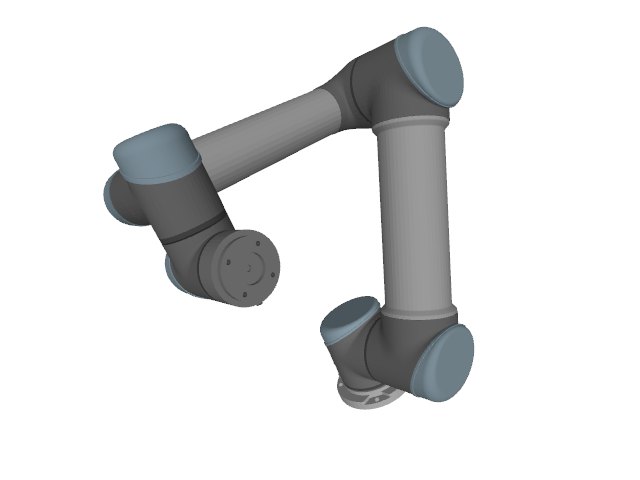
You can visualize a robot in a static configuration:
>>> robot.show(cfg={
...     'shoulder_lift_joint': -2.0,
...     'elbow_joint': 2.0
... })
...
Or animate it over a configuration trajectory:
>>> robot.animate(cfg_trajectory={
...     'shoulder_pan_joint' : [-np.pi / 4, np.pi / 4],
...     'shoulder_lift_joint' : [0.0, -np.pi / 2.0],
...     'elbow_joint' : [0.0, np.pi / 2.0]
... })
...